Live · iOS · Apple Watch · CarPlay · CloudKit · brykk.app
BRYKK
Family location and safety, without the cloud.
A live privacy-first family location and safety app — the Life 360 alternative that keeps your family's data on your family's phones. Crash detection, SOS, translation, Guide Me — the safety toolkit hardened for the moments that matter, with no cloud middleman.
- Swift
- SwiftUI
- CloudKit
- MultipeerConnectivity
- WidgetKit
- watchOS
- CarPlay
- Apple Foundation Models (on-device LLM)
- Translation framework
- Speech framework
- CoreMotion (crash detection)
- WeatherKit
- Cross-platform schema codegen
Origin
How it started
The marketing PDF carries the thesis as its own filename: 'Your Family's Safety In Your Hands, Not Ours.' Where most family-safety apps say 'trust our cloud, pay us monthly,' BRYKK takes the opposite shape. The family's data stays inside the family's devices. The privacy story isn't a marketing line — it's the architecture.
Features
What it does
Live family map
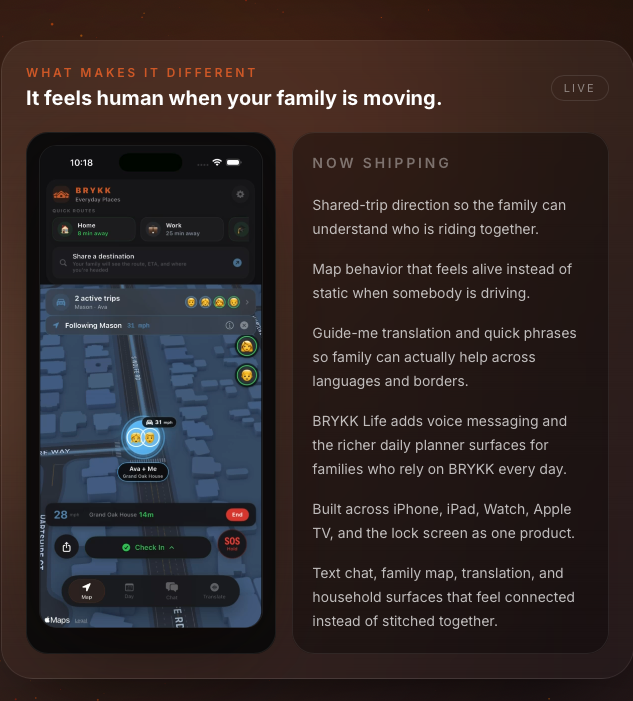
Real-time location of every family member on a single map. Tap any member for distance, ETA, and breadcrumb history.
Place-based notifications
'Sparky arrived home.' 'Avery left school.' Saved-place arrival/departure detection that works without a subscription wall.
Trip / Mission mode + CarPlay auto-start
See a family member's route, ETA, and arrival in real time on Dynamic Island and Lock Screen. Auto-starts the moment CarPlay or Bluetooth hands-free connects — instant departure detection that beats geofences, with a 30-second debounce so red lights and brief restarts don't fire false 'arrived' events.
Crash detection
20 Hz CoreMotion monitoring with an 18 G impact threshold on older iPhones, or Apple's dedicated crash chip on iPhone 14+. A 10-second pre-alert countdown lets the user cancel if they're fine. If they don't, BRYKK auto-broadcasts SOS to every family device with impact speed, G-force, and location, and surfaces nearest fire stations and hospitals.
Medical ID Live Activity post-crash
After a crash event, an iOS Live Activity surfaces medical ID — blood type, allergies, medications, emergency notes — on the Lock Screen and Apple Watch face for first responders, before anyone unlocks the phone. Translated medical labels go through the hardcoded MedicalLexicon, never an AI.
SOS — long-press, with satellite fallback
2-second long-press to broadcast. Family devices receive a full-screen emergency overlay with loud alarm, pulsing red UI, the sender's location, battery, speed, and heading. Manual 911 dial stays in the user's hands by design — BRYKK doesn't auto-call. With no cellular or WiFi, BRYKK guides the user into Apple's Satellite SOS sequence and transmits crash data over satellite.
Guide Me — anywhere on Earth, from your palm
A family member can be 4,000 miles away and you can route them to safety in seconds, without leaving the app. Turn-by-turn guidance to the nearest safe haven — police, hospital, fire station, gas station, anywhere safe — with a mini route map, numbered directions, ETA, and a one-tap handoff to Apple Maps. Built so a family member can be talked to safety, not just watched on a map.
Find them when the battery dies
Tiered location accuracy that scales with motion (idle / active / driving) — and a 'dead-battery beacon' that transmits one final fix at 1% battery, so the family always has a last-known position before the phone shuts off. Saved-place WiFi keeps a slow heartbeat going at home so 'last seen 4 hours ago' never lies.
Family chat
Group chat scoped to the family circle. Lives in the user's iCloud, not on a BRYKK server.
Apple Watch + Dynamic Island
Wrist + always-on glances at family state. Trigger SOS, see the family map, and start a trip from the watch face.
Real-time translation, 18 languages
Two isolated paths: Quick Phrases (tap → speak) for prepared exchanges, and Mic Translation (listen → translate → speak) for live conversation. Built on Apple's Translation + Speech frameworks for on-device performance, with a hardcoded MedicalLexicon — blood types, allergies, medications — that bypasses any AI to ensure exact terminology in emergencies. "Penicillin allergy" translates to "Alergia a la penicilina" every time.
On-device AI support
A built-in support assistant powered by Apple Foundation Models — Apple's on-device LLM, available in iOS 26+. The model never sees a server; user questions never leave the phone. Section-based knowledge-base routing means each request only carries the relevant slice of context, fitting cleanly under the 4,096-token window even as the support KB grows.
Under the hood
Engineering
The diag pipeline that ships universal fixes
April 11, 2026 — a stepfather couldn't get BRYKK location notifications to fire. The natural founder instinct was to ship a fix per symptom. The actual right move was to stop guessing and build a way to read the user's logs. By the end of one evening: 10 iOS commits, 4 website commits, 1 production CloudKit schema fix that affected every BRYKK joiner in every BRYKK family in production, 8 bugs identified end-to-end, and 1 entirely new system shipped from scratch — an in-app debug log uploader (1000-line ring buffer, 7-tap unlock) plus a password-protected internal admin dashboard with status chips, append-only notes, and prior-uploads-from-this-device linking.
The universal-joiner bug
BRYKK families share a FamilyPulse heartbeat record in CloudKit — anyone in the family rings the bell, every other family device wakes up. CloudKit's default Write permission is _creator only. Whoever bumped the pulse first became the only person who could ever update it again. In a 5-person family, 80% of the family was operating in degraded mode the entire time — and the symptom was so soft that the bug had been invisible from the founder's own creator-level device for the entire history of the product. The diag system caught it in a single day. One CloudKit Console checkbox fix. Verified end-to-end with a third upload.
Cross-platform via brykk-shared
The brykk-shared repo holds the cross-platform interconnect layer for BRYKK iOS and Android — schema, codegen, and feature parity tracking. The Generated/ folder in the iOS source is downstream of this. The iOS app and a future Android app share canonical schemas via codegen instead of being kept in sync by hand. Force-multiplier for one engineer building for two platforms.
On-device LLM with section-based context routing
The support assistant uses Apple's Foundation Models (iOS 26+) — fully on-device. Naive integrations would dump the entire support KB into every prompt and blow past the 4,096-token context window. The architecture instead routes each user question to exactly the relevant KB section using a keyword-match table covering battery, location, notifications, translation, crash, SOS, Guide Me, troubleshooting, medical, chat, trips, weather, CarPlay, privacy, BRYKK Life subscription, family, setup, and emergency. Each request stays small, the KB can grow without limit, and the model never sees user data leave the device.
Translation: dual-path, with a hardcoded medical lexicon
Two completely isolated translation paths share nothing except language selection and a thread-safe voice cache. Quick Phrases is for prepared one-tap exchanges. Mic Translation does live speech recognition (Speech framework + SFSpeechRecognizer) → translation (Apple's Translation framework) → text-to-speech, with conversation mode for two-way exchanges. Layered over both is a MedicalLexicon — blood types, allergies (Penicillin, Peanuts, Shellfish, Latex, Sulfa, Aspirin, Ibuprofen, etc.), medications — hardcoded across 18 languages. Medical terms NEVER hit the AI. Defensive engineering: in an emergency, you cannot afford a translation hallucination.
Crash detection without false positives
A naive accelerometer threshold trips on every dropped phone. The defensive version requires three independent signals before the countdown even starts: drive-mode active, current speed >25 mph, and a CoreMotion 18 G acceleration spike at 20 Hz polling. iPhone 14 and newer instead receive Apple's hardware crash event from the dedicated chip and skip the software guards. Only then does the 10-second pre-alert begin — giving the user a window to cancel before the family hears the alarm. False positives in a safety app aren't a UX nit; they're an attack on trust. The architecture treats them that way.
What's next: KOPL-LINK, BRYKK's ephemeral counterpart
BRYKK is the persistent family-safety circle. KOPL-LINK is the same engine in a different shell — for ephemeral group safety: school field trips, recess, after-school activities, events. The load-bearing differentiator is an Apple App Clip, so a parent can scan a QR or tap a link from a teacher and see their kid on a map within seconds, without installing anything. When the event ends, the App Clip data wipes itself by design. Same core (LocationProvider, CloudKitRelay, SafetyManager, MultipeerProvider), event-scoped CloudKit instead of family-scoped, and a 7-target Xcode project — main app, App Clip, watchOS, tvOS for classroom displays, Widgets — already scaffolded. In development.